
Use block conditions in a function
What you’ll build: an order discount that applies only when the customer selects a manual payment method (such as bank transfer). Order discounts can’t see the payment method, but a block can.
Requirements: Business plan and Shopify Plus (for the block).
How it works
Section titled “How it works”Blocks can check far more than functions can: the selected payment type, dates and times, form answers, whether the checkout has a note, and more. See the block rules and function rules lists.
The trick is to pass the answer along:
- An Apply checkout attribute block, with the display rules you need, sets a checkout attribute when its rules pass.
- The function checks for that attribute with a Cart attribute key, value rule.
-
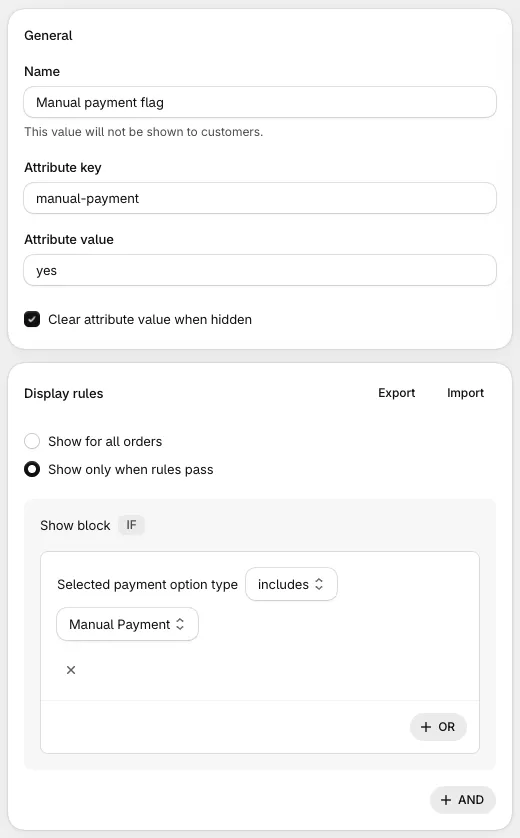
Create the block. Click Create customization and choose Apply checkout attribute.
- Attribute key:
manual-payment - Attribute value:
yes - Tick Clear attribute value when hidden, so the attribute is removed when the rules stop passing.
- Display rules: Show only when rules pass, Selected payment option type includes Manual Payment.
- Save, and note the block’s ID.
- Attribute key:
-
Place the block. It’s invisible, but it must be in checkout to run. Add a Checkout Buddy app block on the payment step in the Checkout Editor, with the block’s ID in Fixed block ID.
-
Create the function. For example, an Order discount with Rule Set 1 and the rule Cart attribute key, value: key
manual-payment, is equal to, valueyes. -
Test it. Select bank transfer and watch the discount apply; switch to card and it’s removed.
Which functions can read cart attributes
Section titled “Which functions can read cart attributes”| Function | Can read cart attributes |
|---|---|
| Hide / rename / reorder payment method | Rule Set 1 only |
| Hide accelerated checkout payment methods | Yes |
| Hide / rename / reorder shipping method | Rule Set 1 only |
| Order discount, order discount code | Rule Set 1 only |
| Collection discount, collection discount code | Rule Set 1 only |
| Shipping discount | Rule Set 1 only |
| Product discount, product discount code | No. Use a line attribute rule, or an order or collection discount |
| Checkout blocker | Rule Sets 1 and 4 |
| B2B order review | Yes |
| Line item price changer | Rule Set 2 only |
| Multi line item price changer | Yes |
Things to know
Section titled “Things to know”- One key per function. A function reads only one cart attribute key (a checkout blocker on Rule Set 4 reads up to five). Use the same key in all of that function’s attribute rules.
- Keys and values must match exactly, including capitals.
- Tick “Clear attribute value when hidden”. Without it, the attribute stays set after the block’s conditions stop being true, and the function keeps acting on it.
- The customer must reach the block. The attribute is only set once the page with the block has loaded. Put the block on the step where the condition can change, or earlier.
- Form fields work too. Every form field already saves its answer as a checkout attribute (keyed by the block’s name), so a function can check form answers directly. See conditional form fields.
- More on the block: checkout attributes.