
Date fields
| Block | What customers see | Plan |
|---|---|---|
| Date field | A date input with a calendar pop-up | Business |
| Date picker | A calendar shown directly on the page | Business |
| Year-month-day fields | Three dropdowns for year, month, and day, for birthdays | Free, Business |
All need Shopify Plus. Dates are saved as YYYY-MM-DD. Read how form fields work for where answers go.
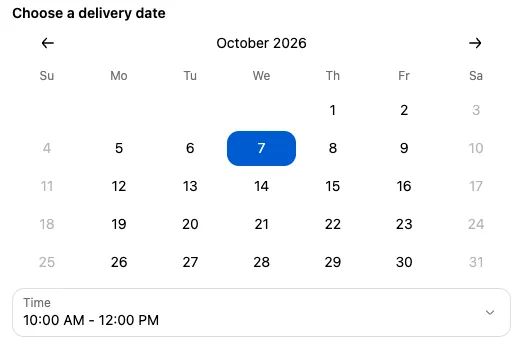
Date field and Date picker
Section titled “Date field and Date picker”Both use the same settings to control which dates can be picked. The Date field has a Label; the Date picker shows only the calendar, so add a Heading to the block to explain it.
| Setting | What it does |
|---|---|
| Days available | Weekdays customers can pick. All seven by default. |
| Lead days | How many days of preparation you need before the earliest date. |
| Cutoff time | The time of day after which an extra day is added to the lead time. |
| Number of future days shown | How far ahead customers can pick. Default 60; use at least 1. |
| UTC offset | The time zone used for “today” and the cutoff. Default (customer’s browser settings) uses the customer’s own time zone. Set your store’s offset so everyone gets the same cutoff. |
| Enable blocked dates | Pick specific dates to disable, such as holidays. |
| Enable max date (all dates after selected date will be disabled) | Disable every date after the one you pick. |
| Exclude disabled days from lead time calculation | Don’t count unavailable weekdays toward the lead time. |
| Enable timeslots | Show a time slot dropdown after a date is picked. See below. |
Past dates are always disabled.
How lead days and cutoff work together
Section titled “How lead days and cutoff work together”- Lead days, no cutoff: the earliest date is lead days plus one from today. With 1 lead day, today and tomorrow are disabled.
- Lead days and a cutoff: before the cutoff, the earliest date is lead days from today. After the cutoff, it’s one day later.
- Cutoff only: after the cutoff, today can’t be picked.
For example, with Lead days 2, Cutoff time 2:00 PM, and weekends unavailable, an order at 10 AM on Monday can pick Wednesday. At 3 PM on Monday, the earliest is Thursday.
Tick Exclude disabled days from lead time calculation if unavailable days shouldn’t count as preparation days. For example, if you don’t work weekends, a Friday order then gets its lead days counted from Monday.
Time slots
Section titled “Time slots”Tick Enable timeslots to show a second dropdown once the customer picks a date.
| Setting | What it does |
|---|---|
| Timeslot label | Default “Time”. |
| Start time, End time | The first and last times of the day. Default 10:00 AM to 6:00 PM. End time must be later than start time. |
| Timeslot intervals | The length of each slot. Default 2 hours. Choosing None turns off time slots. |
| Lead time | For today only: hide slots starting sooner than this. |
| Use 24-hour clock | Show times like 14:00 instead of 2:00 PM. |
The chosen slot is saved under a separate key: the block Name (cut to 23 characters) followed by _time, for example Delivery date_time. The value looks like 10:00 AM - 12:00 PM.
Year-month-day fields
Section titled “Year-month-day fields”Three dropdowns in the order you choose with Date format: YYYY/MM/DD (default), DD/MM/YYYY, or MM/DD/YYYY. The saved value is always YYYY-MM-DD. The words Year, Month, and Day and month names are translated automatically for many languages.
There’s no label, so add a Heading to the block, such as “Date of birth”.
To require a minimum age, tick Apply validation and fill in Minimum age (years) and an Error message. Customers younger than that can’t continue. The check also stops customers who leave the date empty, so make the field required too; that way they see a clear “Required” message first.
Things to know
Section titled “Things to know”- Use the date for rules and messages. The Date (attribute) picked within “X” days display rule can show a block, such as a rush fee banner, when the picked date is soon. See block display rules.
- Blocked dates are stored as moments in time. Customers in a time zone far from yours may see a blocked date shift by a day. Set UTC offset to reduce surprises.
- Changing the date clears the time slot on screen, but the previous slot stays saved until the customer picks a new one. Make the time slot required if it matters.
- Year-month-day lists years from 1914 to 2023. It’s designed for adult birthdays.
- A Date field or Date picker whose saved date is no longer available, for example because the cutoff passed, is cleared when the customer returns to checkout.