
Data, attributes, and privacy
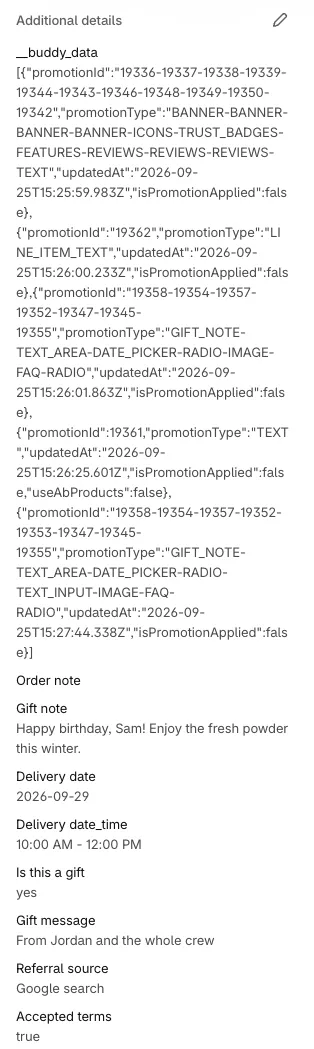
Checkout Buddy saves some information on your orders. Some of it is for you, such as answers from form fields. Some is for the app, used for analytics and discounts.
What’s added to orders
Section titled “What’s added to orders”| What | Where you see it in Shopify | Added by |
|---|---|---|
| Form field answers | Additional details on the order, labeled with the block’s Name | Form field blocks |
__buddy_data |
Additional details on the order | Any block customers see at checkout |
_buddy_data |
Under the line item, on items the app added or changed | Upsell / Cross sell, Checkbox product offer, Line item upsell, Cart line editor |
| Order note | Notes on the order | Order note block, and form fields set to add to the note |
| Metafields | Metafields on the order, once you’ve created a definition | Form fields set to save as a metafield |
__buddy_data and _buddy_data contain the block ID and a timestamp. __buddy_data also records the block type and whether the customer accepted the offer. They power analytics, the Block IDs and Line item added by Checkout Buddy rules, and product discounts for checkout components.
Stop adding tracking data
Section titled “Stop adding tracking data”In the Checkout Editor, turn on Disable custom attributes in each Checkout Buddy app block. __buddy_data and _buddy_data are no longer added to orders from that app block.
Hide the data from your theme and emails
Section titled “Hide the data from your theme and emails”Names that start with an underscore (_) are private by Shopify convention. Most themes and Shopify’s default notification templates already hide them. If your theme shows _buddy_data in the cart or __buddy_data in an order confirmation, update the loop that prints properties or attributes to skip private ones:
{% for property in item.properties %} {% assign first_character = property.first | slice: 0 %} {% unless first_character == '_' %} {{ property.first }}: {{ property.last }} {% endunless %}{% endfor %}Variable names differ between themes. The idea is to skip anything whose name starts with _. See Shopify’s guide to hiding line item properties. This keeps analytics working.
Use the data in emails and Shopify Flow
Section titled “Use the data in emails and Shopify Flow”Form field answers are order attributes, keyed by the block’s Name. In a notification template, such as the order confirmation, use:
{{ attributes["Gift message"] }}In Shopify Flow, the same values are available as the order’s custom attributes, so you can use them in conditions, such as “tag the order when Delivery date is set”. See how form fields work.
What Checkout Buddy stores
Section titled “What Checkout Buddy stores”- Your store: name, email addresses, phone number, owner’s name, currency, Shopify plan, time zone, and your Checkout Buddy plan.
- Your customizations: blocks are stored in your store’s metafields and in the app’s database. Functions are stored in Shopify.
- Orders and customers: Checkout Buddy doesn’t store orders or customer data. Analytics reads orders from Shopify when you open it. Anything customers type into form fields is saved by Shopify on the order, not by the app.
When you uninstall
Section titled “When you uninstall”- Your subscription is cancelled and the app’s access to your store is removed.
- Blocks disappear from checkout and functions stop running.
- Your block settings are kept, so if you reinstall, your blocks are still there. Email kyle@keylayapps.com if you’d like them deleted.
- Data already on your orders, such as form field answers and
__buddy_data, stays on those orders.
See the privacy policy for full details.