
Rules for a specific line item or shipping option
Most display rules look at the whole cart. Line item tags includes final-sale passes if any product in the cart has the tag, and every copy of the block shows.
Target rules look at one line instead: the line the block is sitting under. Use them when you want a message under some products and not others, such as “Final sale” only under items tagged final-sale.
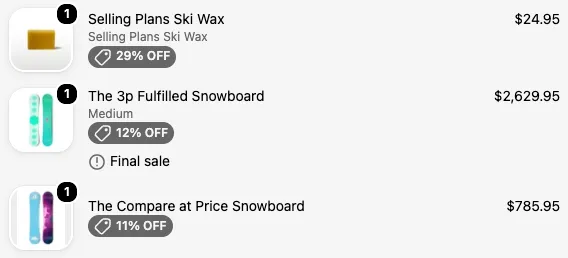
Where target rules work
Section titled “Where target rules work”Target rules only mean something when the block is placed under each line item in the order summary. In the Checkout Editor, that’s the Checkout Buddy app block placed in the line item slot. See placing blocks.
In that slot, Checkout Buddy runs the block once for every line in the cart. Each copy checks the rules against its own line, so the block can show under one line and hide under the next.
The Target shipping method title rule works the same way for shipping options: place the block under each shipping option, and each copy checks the option it sits under.
Target line item rules
Section titled “Target line item rules”| Rule | What it checks on the line | Notes |
|---|---|---|
| Target line item title | The product title contains the text | Capitals ignored. |
| Target line item subtitle (variant title) | The variant title contains the text | Products without variants have no subtitle, so both includes and does not include fail. |
| Target line item tags | The product has any of the tags | Comma list. Exact, case-sensitive. |
| Target line item attribute key | The line has a property with this key | Line item properties, such as engraving text or _buddy_data. |
| Target line item attribute value | Any property on the line has this exact value | |
| Target line item variant metafield | The variant’s metafield has this value | Namespace, Key, Value. Blank Value with is equal to means empty or missing. |
| Target line item product metafield | The product’s metafield has this value | Same fields. |
| Target line item compare-at price exists | The variant has a compare-at price | |
| Target line item compare-at price greater than price | The variant is on sale | Compares the variant’s compare-at price with its price. |
| Target line item discount allocation exists | The line has a discount applied | |
| Target line item quantity | The line’s quantity | Number operators. |
| Target line item product type | The product type contains the text | Comma list. Only matches product types that are written in lowercase in Shopify, so “Shirts” never matches. Use the cart-wide Line item product type rule where you can. |
Target shipping method title
Section titled “Target shipping method title”Target shipping method title checks the name of the shipping option the block sits under. The whole name must match, ignoring capitals: express matches “Express” but not “Express Saver”.
Use it to add a description under one shipping option, for example “Delivered in 1–2 days, signature required” under “Express”. See add a description to a shipping method.
Mixing target and cart-wide rules
Section titled “Mixing target and cart-wide rules”You can combine target rules with any other rule. For example, to show “Add gift wrap?” under items tagged giftable, but only for orders over $50:
Group 1: Target line item tags includes giftableANDGroup 2: Cart subtotal is more than 49.99Thank you and order status pages
Section titled “Thank you and order status pages”The line item slots on the thank you and order status pages support a smaller set of target rules: Target line item tags, Target line item attribute key, Target line item attribute value, and Target line item variant metafield. Other target rules always fail there, so a block that uses them never shows. See thank you and order status blocks.