
Order note
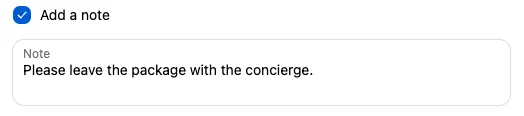
The Order note block adds a note box to checkout. What the customer types becomes the order’s note in Shopify, which you see in the Notes section of the order.
Available on the Free and Business plans. Needs Shopify Plus.
Settings
Section titled “Settings”| Setting | What it does |
|---|---|
| Checkbox label | Default “Add a note”. The note box only appears once the customer ticks this. Leave it blank to always show the note box. |
| Note label | The label of the note box. Default “Note”. |
Both labels can be translated under Translations.
How the note is saved
Section titled “How the note is saved”- The text replaces the order note. If the customer unticks the checkbox, the note is cleared.
- The text is also saved as a checkout attribute, with the block Name (first 28 characters) as the key. This lets you use it in display rules or emails.
Things to know
Section titled “Things to know”- One note per order. If you also have a text field with the Apply value to order notes effect, or another app that writes the note, they overwrite each other. Use one method.
- The note box looks required, but customers can continue without filling it in.